
12306 vs Trip.com
| 12306 | Trip.com | |
|---|---|---|
| Ticket Processing Time | Real-time | A few minutes |
| Handling Fee | 0 | Subject to payment page |
| Language | Chinese, English | Over a dozen languages |
How to Register on 12306
First, search for and install 12306 from the App Store or your app store.
Fill in Your Information
Open the app and follow these steps:
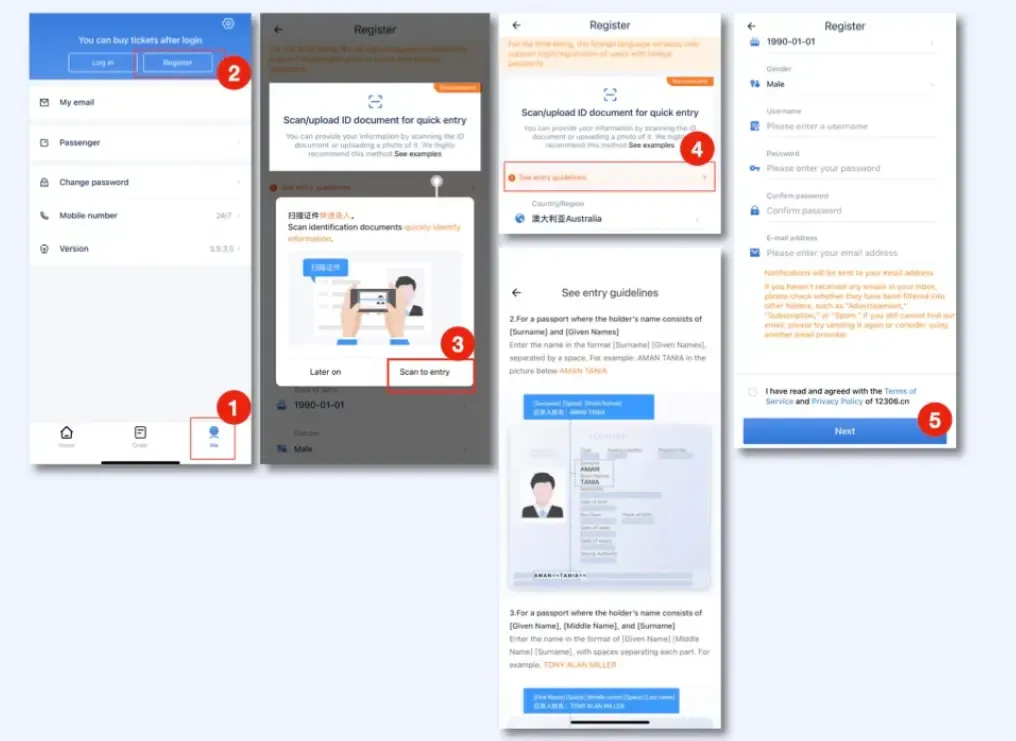
- Tap Me (bottom) → Register
- Scan or upload your passport info page for quick entry, or fill in manually
- Enter your region, name (must match your passport exactly), ID number, ID expiry date, username, password, and email
- Tap Next
Verify Your Email
Log in to your email, find the activation email from 12306, and click the activation link.
Upload Passport Photos
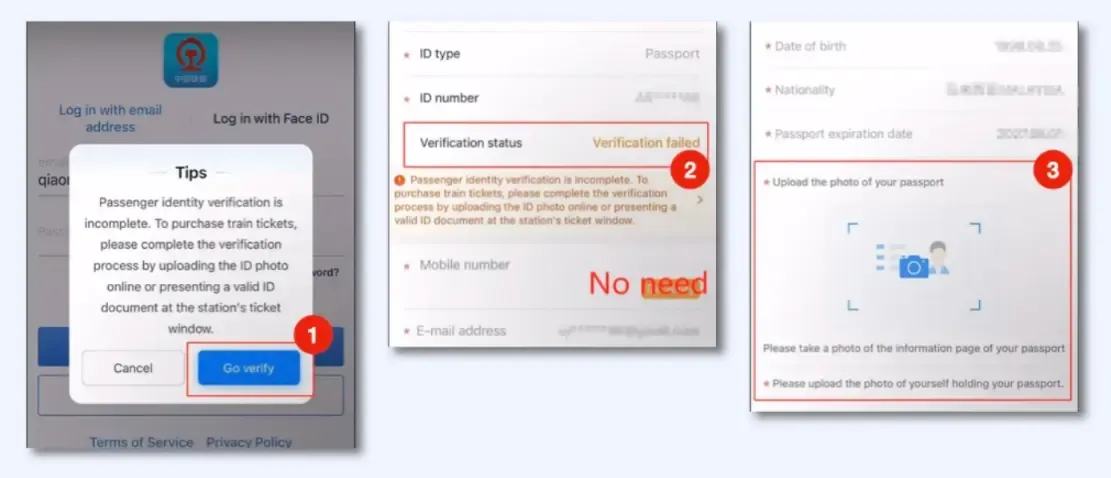
Log in to the app with your email → A prompt will appear asking you to complete verification → Tap Go to Verify → Tap the notification under Verification Status → Upload a clear photo of your passport info page (the machine-readable zone must be visible) → Upload a clear photo of yourself holding your passport
Add Passengers
If there are other passengers, add them to My Passengers:
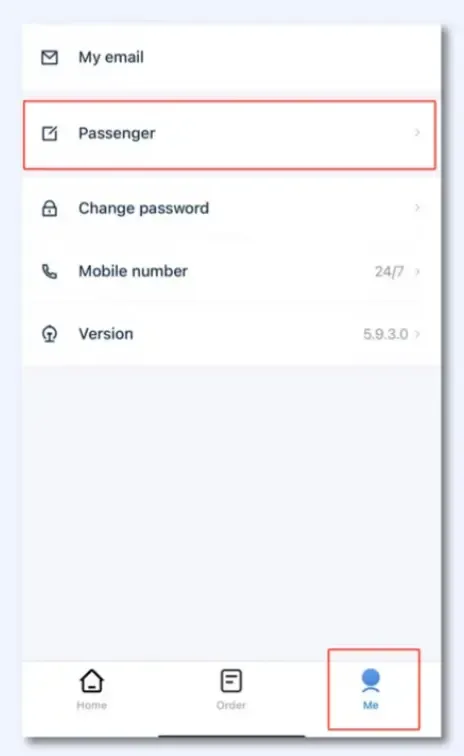
- Tap Me → Passengers
- Enter each passenger’s name, valid ID type, and ID number
- Wait 3–5 business days for review (submit all passenger information a few days in advance)
- Return to the My Passengers list and confirm all passengers show Verified status
Choosing Your Seat Class
High-speed trains (G/D/C) offer these main seat classes:
| Seat Class | Features | Best For |
|---|---|---|
| Second Class | 3+2 layout, lowest price | Most trips |
| First Class | 2+2 layout, wider seats with extra legroom | Long rides in comfort |
| Business Class | Lie-flat seats, meals and VIP services included | Generous budgets |
| No Seat | Standing ticket, only appears after seats sell out | Last resort — avoid if possible |
Long-distance conventional trains (K/T/Z) also offer Hard Seat, Hard Sleeper, Soft Sleeper, and Premium Soft Sleeper; for overnight trips, book at least a Hard Sleeper.
Tip: Seat numbers are assigned automatically, but some high-speed trains let you pick a seat when booking — try A or F for a window seat.
How to Pay
After reserving a seat on 12306, you must pay within the time shown on the page, or the seat will be released.
- Domestic payment channels: bank online banking, UnionPay, Alipay, and WeChat Pay (official guide, in Chinese)
- 12306 English website: also accepts international card schemes such as VISA, Mastercard, JCB, and Diners
- The easiest option for foreign travelers is usually Alipay linked to an overseas bank card
If you don’t have any Chinese payment tools, Trip.com is a fallback — it accepts overseas bank cards and more international payment methods, but charges a service fee.
Tip: The 12306 advance booking window is generally 15 days; popular trains sell out fast around holidays, so book as soon as sales open. Before your trip, it’s worth checking the public holiday calendar to plan ahead and avoid peak travel dates.
Change and Refund Rules
Based on the 12306 official rules:
Refund fees
| When You Refund | Fee |
|---|---|
| 8 days or more before departure | Free |
| 48 hours to 8 days before departure | 5% of the ticket price |
| 24 to 48 hours before departure | 10% of the ticket price |
| Less than 24 hours before departure | 20% of the ticket price |
Change fees
| When You Change | Fee |
|---|---|
| More than 48 hours before departure | Free |
| 24–48 hours before departure, to a train after the ticket date | 5% of the lower fare |
| Less than 24 hours before departure, to a train after the ticket date | 15% of the lower fare |
| After departure (before midnight), to a next-day or later train | 40% of the lower fare |
Key points:
- Each ticket can only be changed once; changing to a same-day or earlier train within 48 hours of departure, or to a same-day train after departure, is free
- After departure you can still change to another same-day train, but only at the departure station shown on your ticket
- Changing the destination station requires a request more than 48 hours before departure, and blocks any further changes
- Tickets changed to dates during Spring Festival travel season are refunded at the “less than 24 hours” rate (20%)
FAQ
Do I need to print my train ticket?
No. China’s trains run on e-tickets: your passport is your ticket. Staff scan your passport at security, the boarding gate, and on the train. You can print an itinerary sheet for your records, but it cannot be used to board.
How far in advance can I book?
The 12306 booking window is generally 15 days. Set a reminder and book early for popular routes during holidays.
Can foreigners use the 12306 app?
Yes. The 12306 app and the English website both support foreign passports — in fact, the English website accepts only valid foreign passports.