
Alipay is one of the two dominant mobile payment apps in China. For most foreign visitors, it is the more straightforward one to set up because its flows are designed with international travelers in mind. This guide walks you through the full setup, from downloading the app to making your first payment.
If you are also setting up WeChat Pay, see WeChat Pay and Alipay for Foreigners for a broader overview on managing both.
Still deciding which app to prioritize? Read Alipay or WeChat Pay: Which One Should Travelers Set Up First.
What you need before starting
Gather these before you begin:
- Alipay app — Download or update to the latest version on your phone. Register with your phone number and sign in.
- A valid identity document — One of the following:
- Passport (for overseas users)
- Mainland Travel Permit (for Hong Kong, Macao, or Taiwan residents, who can also use a passport)
- Foreigner’s Permanent Residence Identity Card
- An international bank card — Visa, Mastercard, JCB, Discover, Diners Club, or other major international credit or debit cards are supported.
- A mobile phone number that can receive SMS — International phone numbers are supported.
Step 1: Complete real-name authentication
Enter the real-name authentication page
Open Alipay, then navigate: Me (bottom right) → Settings (gear icon, top right) → Account and Security → Identity Information → Basic Identity Information.
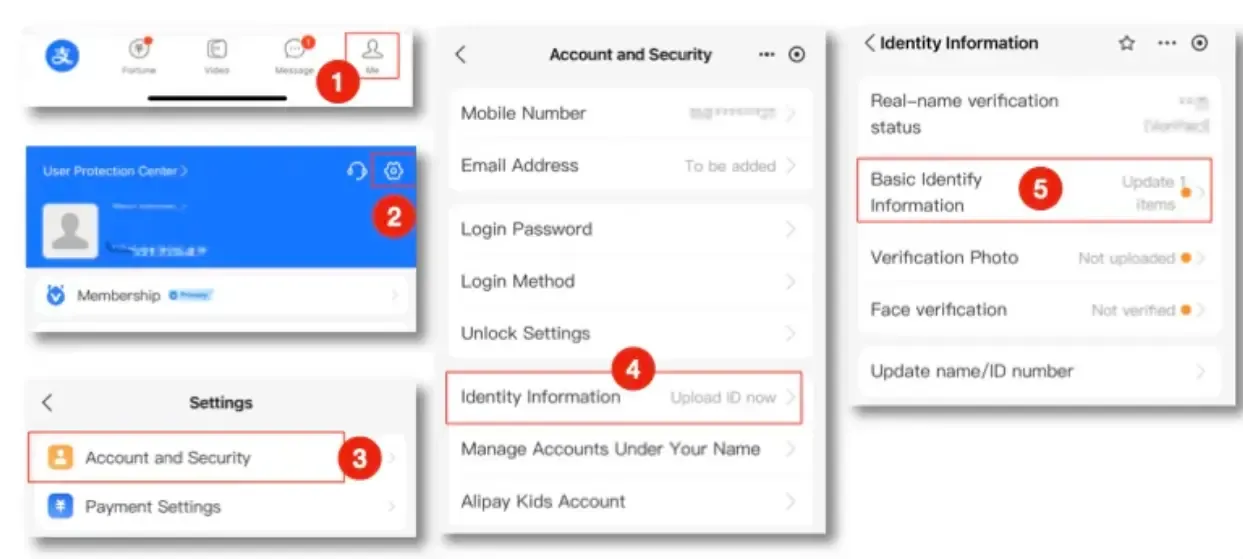
Fill in personal information
Enter your name, gender, document type and number, expiration date, occupation, and address exactly as prompted. Use the same name format as your passport — typically Surname followed by Given Name.
Upload verification photo
Go back to Identity Information → Verification Photo → upload a clear photo of your identity document (for example, the info page of your passport).
Real-name verification is required for payments over ¥200 per transaction.
Step 2: Add an international bank card
Access the card linking page
Navigate to Me → Bank Cards → Add Bank Card.
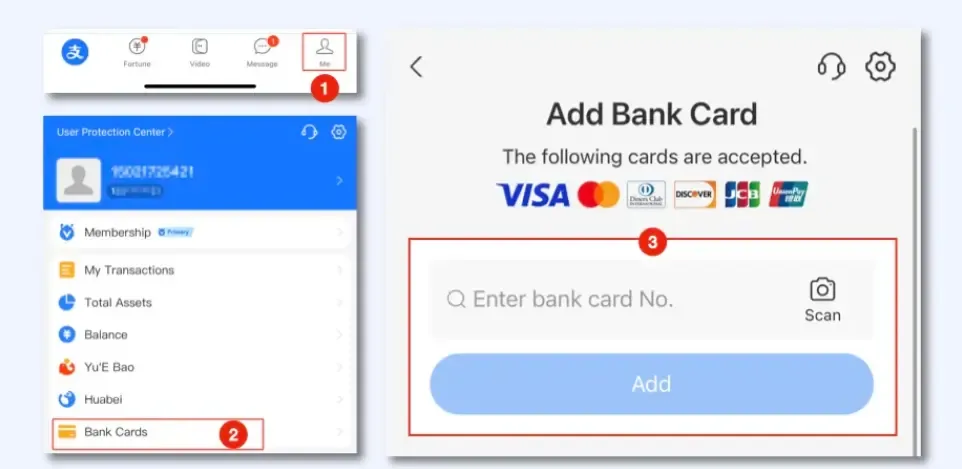
Enter card details
Input your card number, expiration date, CVV/CVC, and select the issuing country. Review the service agreement, then tap Agree to Terms and Add.
After linking, it is worth doing a small test. Open the payment screen, confirm your card is visible, and make sure the app does not ask you to re-verify anything.
Usage restrictions and precautions
Exchange rate
Settlement is based on the real-time exchange rate of the international card organization or the issuing bank. You do not choose the rate — it is applied automatically at the time of the transaction.
How to pay with Alipay
There are two ways to pay:
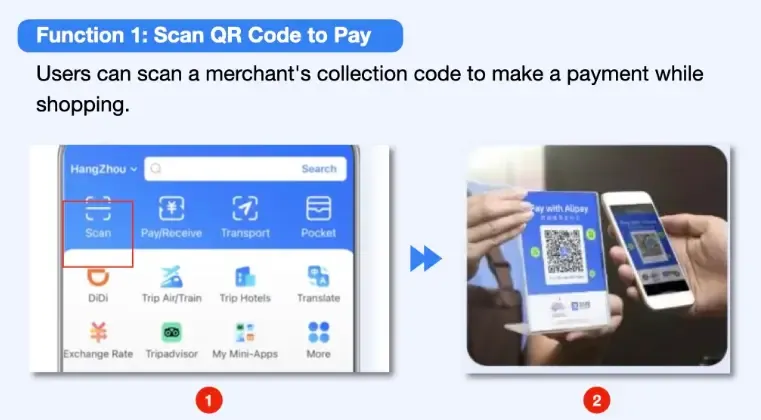
Scan QR code to pay
Open Alipay and tap Scan. Point your camera at the merchant’s QR code to complete the payment. This is the most common method at small shops and street vendors.
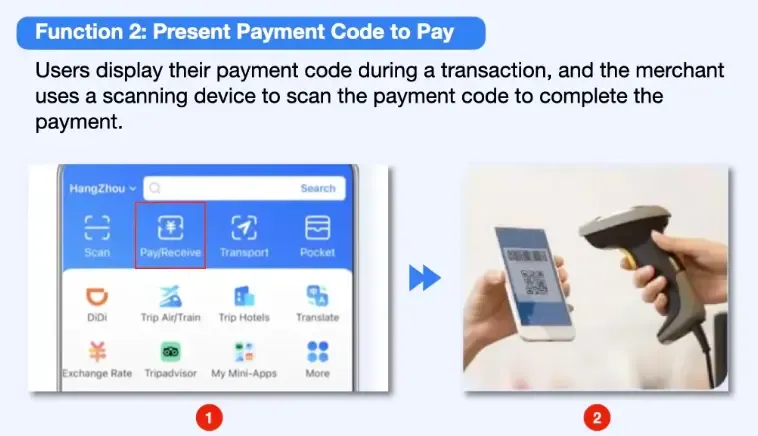
Present payment code to pay
Open Alipay and tap Pay/Receive. The app will display a barcode and QR code on your screen. The merchant scans your code with their device. This is typical at convenience stores, supermarkets, and chain restaurants.
FAQ
Why does real-name verification fail?
The most common cause is a blurry or reflective photo of your passport — retake it in bright, even lighting so every detail is fully visible, then resubmit. Alipay requires the document photo to be a clear, complete, unedited color original. Also check three things: ① Make sure your name follows the Surname + Given Name format and matches your passport exactly. ② Upload both the passport info page and the visa page (if applicable). ③ If it still fails, contact customer service (+86 571 2688 6000) for manual review.
How to unfreeze an account blocked by risk control?
Submit your passport, entry stamps, and proof of a China address (hotel booking confirmation or rental contract). Manual review typically takes 3–5 business days.
Can I withdraw Alipay balance to a foreign account?
No. Balances loaded from foreign cards cannot be withdrawn — they must be spent.
Customer service
- Alipay hotline: +86-95188
- English language service: +86-571 2688 6000 (if you are calling from a Chinese number, dial 0571 2688 6000)